
참고 :
After doing a lot of efforts finally installed 2008 32 bit in my Windows 7 64 bit. Well its not that difficult just go through these steps.
Download Orca MSI editor first. You can download it at here.
1. Install it.
2. Copy the Cad installation files to your hard drive if you have it on CD.
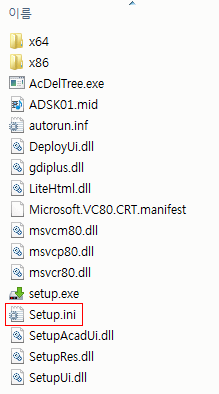
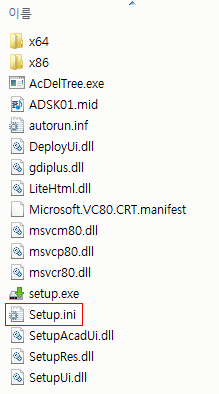
3. Backup the files ACA.msi and Setup.ini somewhere else for safety purpose or you can very well skip this step as well.
4. Right click and edit the ACA.msi with Orca and delete the action found in the table “InstallExecuteSequence” that is called “CheckFor64BitOS” Delete the same line under table “CustomAction”
5. Save and close the ACA.msi
6. Edit the Setup.ini with Notepad. Delete the line under
“#==================== Platform Requirement” that is labeled “PLATFORM=NO_WOW_64_PROCESS” 7. Double-click the Setup.exe and you should be able to install without any problems. – See more at:
http://thetechdomain.blogspot.kr/2011/05/installing-autocad-32-bit-in-windows–
7.html#sthash.r7zITsWr.dpuf
=================================================================================
방법 2
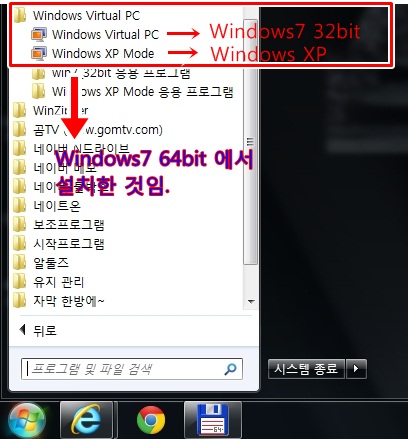
윈도우 7 64bit 에는 Virtual PC 와 XP mode 가 지원됩니다.
Virtual PC 는 윈도우7 64bit 에서 윈도우7 32bit를 설치해서 사용하는 것이고
XP mode는 윈도우 XP를 사용하는 것입니다.
Virtual PC 와 XP mode, 둘 중에 하나만 사용해도
AutoCAD 2014 32bit 까지 모든 32bit 프로그램을 사용가능하니,
이런 방법도 한번 생각해 봤으면 합니다.
가성화를 이용해 32비트 XP 나 WIN7 을 하나더설치하면 됩니다..
주의….
이때반드시 메인메모리는 8기가 이상이어야 속도저하없이(100M이상 도면도) 똑같이 사용가능하며,.
정품 WINDOWS 7 프로 이상이어야합니다…
…잘됩니다… 집에서 사용하는데 이상없이 사용중입니다…
설치도 메우 단순합니다… 아래 링크잠조하셔요!!!
http://www.microsoft.com/windows/virtual-pc/download.aspx
위와 같이 사용하신다면 다소 불편하지만,
프로그램 저작권에 상관없이 사용가능 하다고 봅니다.
http://support.microsoft.com/kb/979462/ko
위 싸이트에 가시면 자세한 설명이 되어 있고, google 에서 Virtual PC를 검색해 보시면
많은 도움 받으실 수 있을 것입니다.
참고) Virtual PC 와 XP mode 는 윈도우7 64bit 부팅후
다른 응용프로그램처럼 사용하시면 됩니다. 멀티부팅 이라던가 뭐 이런 개념이 아님
———————-———————-———————-
세번째방법은
64비트에 오토캐드 2008을 사용
이때 32비트 2008을 설치후, 드림을 설치하시면 됩니다..
설치시 나, 설치후..반드시 – 마우스오른쪽 – 호환성 – WINXP SP3 아래 관리자권한체크 필수

답글 남기기